Getting Rhythmic with Soundtoys Plug-Ins
Also in this recording SoundToys EchoBoy - Delay Plug-in
Mitch Thomas from SoundToys goes through the SoundToys plug-in library and displays the tips and tricks of thier collection

More
More
Hardware & Accessories
From SoundToys
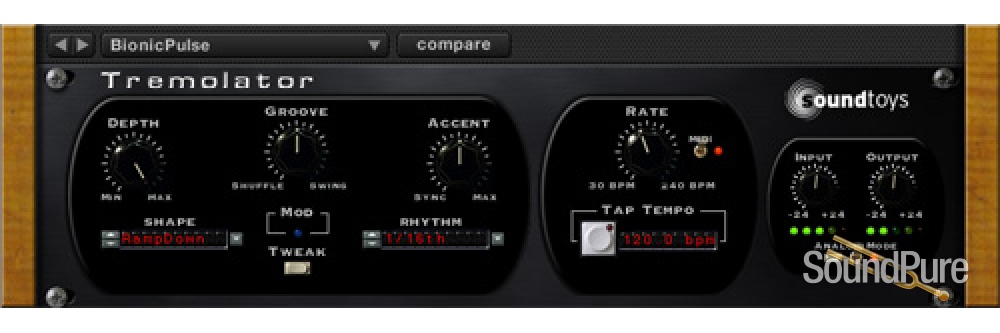
Add dynamic control of speed and depth that lets the tremolo respond to the music. Then toss in MIDI sync to lock to your tempo. Oh, yeah, then there's our programmable Rhythm Editor that lets you write custom patterns and turns this amazing tremolo into an outrageous rhythmic auto-gate. Vintage guitar effect and modern remix tool at your service.
Gear heads that we are, we broke out the test gear and analyzed the waveforms created by some of our favorite old gear. Then we used our custom LFO waveshape editor built into Tremolator to perfectly recreate them. It's very interesting to look at these shapes and see why each of these vintage pieces has a unique sound. Pass that through our Analog mode, which emulates going in and out of a piece of analog hardware, and you've got all the pieces of a great sounding tremolo.
Switch the nice smooth tremolo waveforms over to a sharp square wave and you turn this into a monster of an auto-gate. You can lock it to MIDI with the flip of a switch, then select 1/8th notes, 16th notes or whatever fits the rhythm you need. If straight note pulses aren't what you need, use the Rhythm Editor to write your own cool groove (You can even pull a groove from our library). More? Add some swing or shuffle, accents, and analog mode. You can even use the Waveshape Editor to tighten or loosen the gate time.
In the Tweak menu, you'll find the Dynamics controls. These parameters let your playing control the speed and/or depth of the modulation. You can create cool speed ups or slow downs based on how loud or soft you play. You can create smooth increases in depth as your chords fade out, or heavy tremolo that fades away. Plus there are already some great presets in our Dynamics folder that you can "tweak" to fit your needs.
AAX Native, AAX AudioSuite, VST, and Audio Units (AU)
An internet connection is required at the time of activation.
Pro Tools (10.3.5 or later), Live, Cubase, Nuendo, Sonar, Logic, Digital Performer
iLok.com account (An iLok USB dongle is not required. Create a free account at iLok.com)
Watch & listen
Also in this recording SoundToys EchoBoy - Delay Plug-in
Mitch Thomas from SoundToys goes through the SoundToys plug-in library and displays the tips and tricks of thier collection
Also in this recording SoundToys v5.5 Plug-in Effects Collection SoundToys FilterFreak - Filter Modulation Plug-in SoundToys PhaseMistress - Phaser Plug-in
Mitch Thomas from SoundToys shows off the cool tricks and effects of the SoundToys plug-in collection
Manuals & documents
In addition to the standard included manufacturer warranty, virtually all new products carry our exclusive, industry-leading, absolutely free Sound Pure 3-Year Warranty, which includes parts and labor. It's our way of adding real value to the personal touch our small, dedicated team brings to every purchase.
Coverage exclusions live in Terms & Conditions, Section 27. Read the warranty →

Sound Pure Studios · Durham, NC
Sound Pure is a working studio in Durham, NC — a 1,000 sq ft live room and two pro control rooms. Book a session to audition gear in a world-class acoustic space before you buy.